Pages

Showing posts with label weebly. Show all posts

Tuesday, February 19, 2013

Techy Tidbit: Weebly App

This year I setup a class website using Weebly. You can read about that and even watch a video tutorial by going here. 

  
I've really loved Weebly so far. It's super easy to use and my parents love having class resources at their fingertips. I had hoped to include my students more in the blogging process, but haven't quite figured out how to make that work. 

But when I want to do a quick post, this Weebly app comes in handy.  I have it downloaded onto my classroom iPad and on my iPhone. 

When I first enter the app it takes me to the home screen where I choose which site I want to open.


It will show me the list of posts I've already made. By clicking the orange Post button at the bottom, I am taken to the screen to start a new post. 

From here I can enter my post title, insert text or photos and publish directly from either device. I love the simplicity of this app and the fact that I can post from anywhere!


If you have a Weebly site with a blog, this app is a must have.

If you're still on the market for a place to host your class website, Weebly is a great one for you to check out.

Friday, August 31, 2012

Tech Tools: Educreations

I am so excited about this post because I think the resources I am going to share are simply amazing! Several other fabulous bloggers have already mentioned these tech tools, but I promise they are worth mentioning again. 

Awhile back I posted a video for how to create a classroom website and blog using Weebly For Education. You can check that out here.
I have been slowly adding resources for parents and students. I've entered a few blog posts myself, but hope to have student input soon!

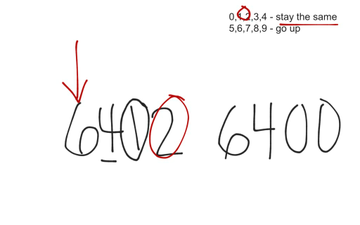
Today I posted a video about rounding numbers. I created the video using the Educreations app on my iPad. With this app I was able to record my voice while I demonstrated the lesson on a virtual whiteboard. The great part is that you don't have to have an iPad to use Educreations. You can use it right online!

Here is a what the screen looks like when you begin creating a lesson online. When you do it through the app it looks like there are a few more options, like entering typed text. 


Using your finger or a stylus, you can write whatever you would normally write on your whiteboard during your lesson. I love that I can easily change colors, insert typed text, and clear the screen quickly to make more room on the "board". 

Here is a screenshot from the end of my lesson on rounding.

Rounding 

The best part is that I can email this video to parents, share it on Facebook or Twitter, or embed it in a blog, like I did on my Weebly site. 

It's too late now, but first thing in the morning I'll be using remind101 (if you're not familiar with remind101, you need to head over to Mrs. Stanford's blog and check out her video tutorial) to quickly let parents know to check the blog and watch the video on rounding. Now all of my parents will know how to help their child at home, and students can have a quick refresher if they need it. How great is that!   

Friday, August 3, 2012

Weebly...A Classroom Website Video Tutorial

A huge thanks to Michele from Multiage Moments for inspiring me to take the plunge and start a website and blog specifically for my students. 

She has a post that shares about her experience having her students blog and she also gives a few sites you can use to build your site and blog. You can check that out here.

I decided to go with Weebly for Education. 

I chose Weebly mainly because our technology teacher uses it with our middle school students (so I know it must be easy!), but also because it was free and it allowed me to have a site and a blog together rather than being geared towards every student having their own blog (which is not what I wanted to do).  

Here is a very quick and very basic tutorial for setting up a website and blog through Weebly for Education. Please excuse my kids screaming playing in the background. Let me know how the video comes out. It was quite a fiasco trying to get rid of the blurriness factor and I'm still not 100% sure it worked. Thanks in advance!